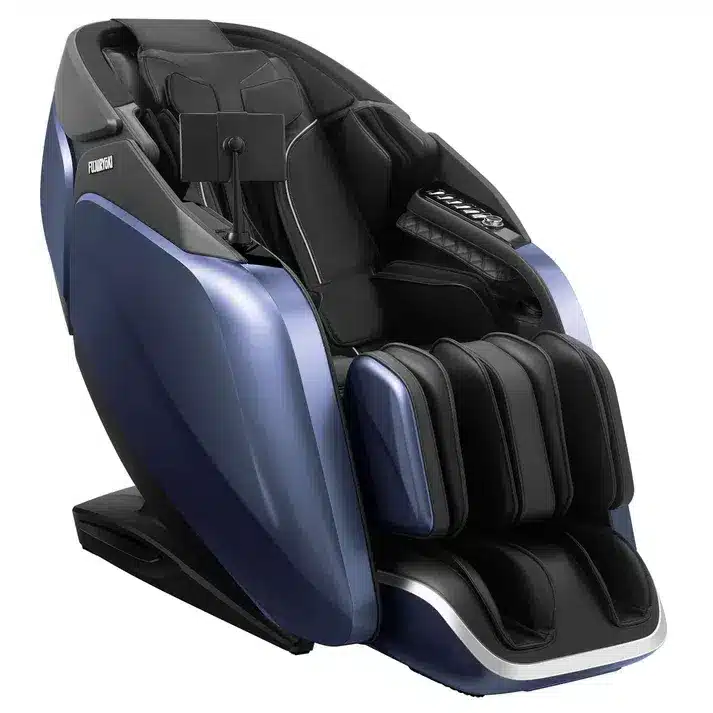
Hi, I’m Dr. Alan Weidner from Massage Chair Relief, and today I’m going to show you how to use the Fujiiryoki Cyber Relax Pro massage chair for the first time.
Getting Into the Chair
As with most massage chairs—unless they have side-opening doors—you’ll want to straddle the ottoman and slide yourself into the seat. Try not to put any weight on the ottoman, especially your full body weight. It’s not designed to support that, and parts can break.
Once seated, slide all the way back into the chair. You may notice your feet lifting slightly at first—don’t worry. That doesn’t mean the chair doesn’t fit you. Once the chair powers on, it will recline and the ottoman will rise to meet your feet, positioning you correctly.
Powering On
There are two ways to turn the chair on:
-
Use the power button on the remote control, or
-
Use the quick-key power button on the side of the chair
For this demonstration, I’ll use the quick key. Press and hold it for a couple of seconds. The remote will light up with the Fujiiryoki logo, then display the main menu.
Selecting a Program
You’ll see a prompt asking you to select one of the recommended courses. This is exactly what I recommend for first-time use.
Choose one of the following:
-
Gentle
-
Stretch
-
Deep Tissue
These three programs span the full range of intensity, so they’re a great place to start.
If you press the Home button, you can access:
-
Auto programs
-
Manual programs
-
Favorites
But for now, stick with the recommended programs—that’s the default starting point.
Language Settings
The chair also allows you to change languages. In addition to English, options include:
-
Chinese
-
Vietnamese
-
Korean
-
French
Just select whichever language you’re most comfortable with.
Headrest & Neck Massage
You can adjust the headrest if you’d like. I often fold it up and over the back of the chair so I can feel more of the neck massage. For this demo, I’ll leave it in place.
This chair also features neck airbags, which is a unique and very nice touch. On certain programs, they gently massage and support the neck.
Starting the Massage
Let’s select the Meditation program.
As soon as the program begins:
-
The chair will start to recline
-
The ottoman will rise to meet your feet
This is when the chair really begins to fit your body properly.
The Cyber Relax Pro generally fits users from about 5 feet tall up to around 6’3″. I’m 5’9″, right in the middle of that range, and it fits me very well.
The chair is now performing a body scan—sometimes referred to as “measuring the back.” Once the scan is complete, the program you selected will begin automatically.
That’s it. At this point, you can just relax and let the chair do its thing.
Ending the Session
There are two ways to finish:
-
Let the program run to the end—the chair will automatically return to its neutral position.
-
Turn the chair off mid-program—the chair will still return to neutral.
There’s also a setting in the Settings menu that lets you choose what happens at the end of a session. You can set the chair to:
-
Return upright (default), or
-
Stay reclined
Some people fall asleep in the chair and prefer it to stay reclined, which can be very helpful—especially for those who have trouble sleeping.
Powering Off
To shut the chair down, press and hold the power button again—either on the quick keys or on the remote. The screen will go dark, and the chair will gently return to its neutral position.
Final Thoughts
That’s really all you need to know to get started with your Fujiiryoki Cyber Relax Pro.
As I mentioned in the introduction video, this is a split-track chair with two sets of rollers, and it delivers an excellent massage. Fujiiryoki is a Japanese company with a long history of quality design, and they also represent several other premium models.
I hope you found this video helpful. If you did, please give us a thumbs up, subscribe to our YouTube channel, and help us spread the word by sharing this or any of our videos with friends and family on social media.
I’m Dr. Alan Weidner from Massage Chair Relief, and I’ll see you in the next video.
Bye-bye.